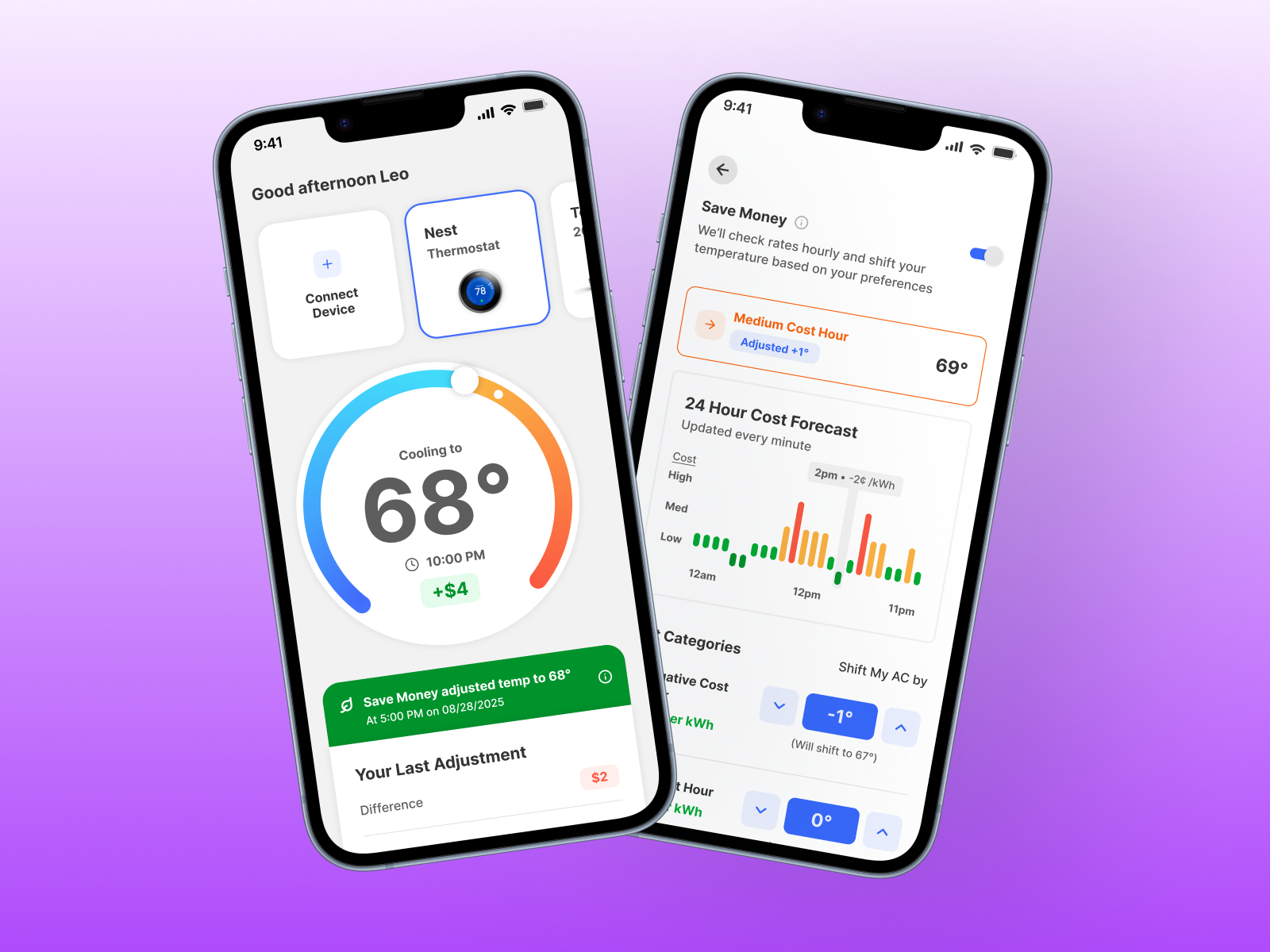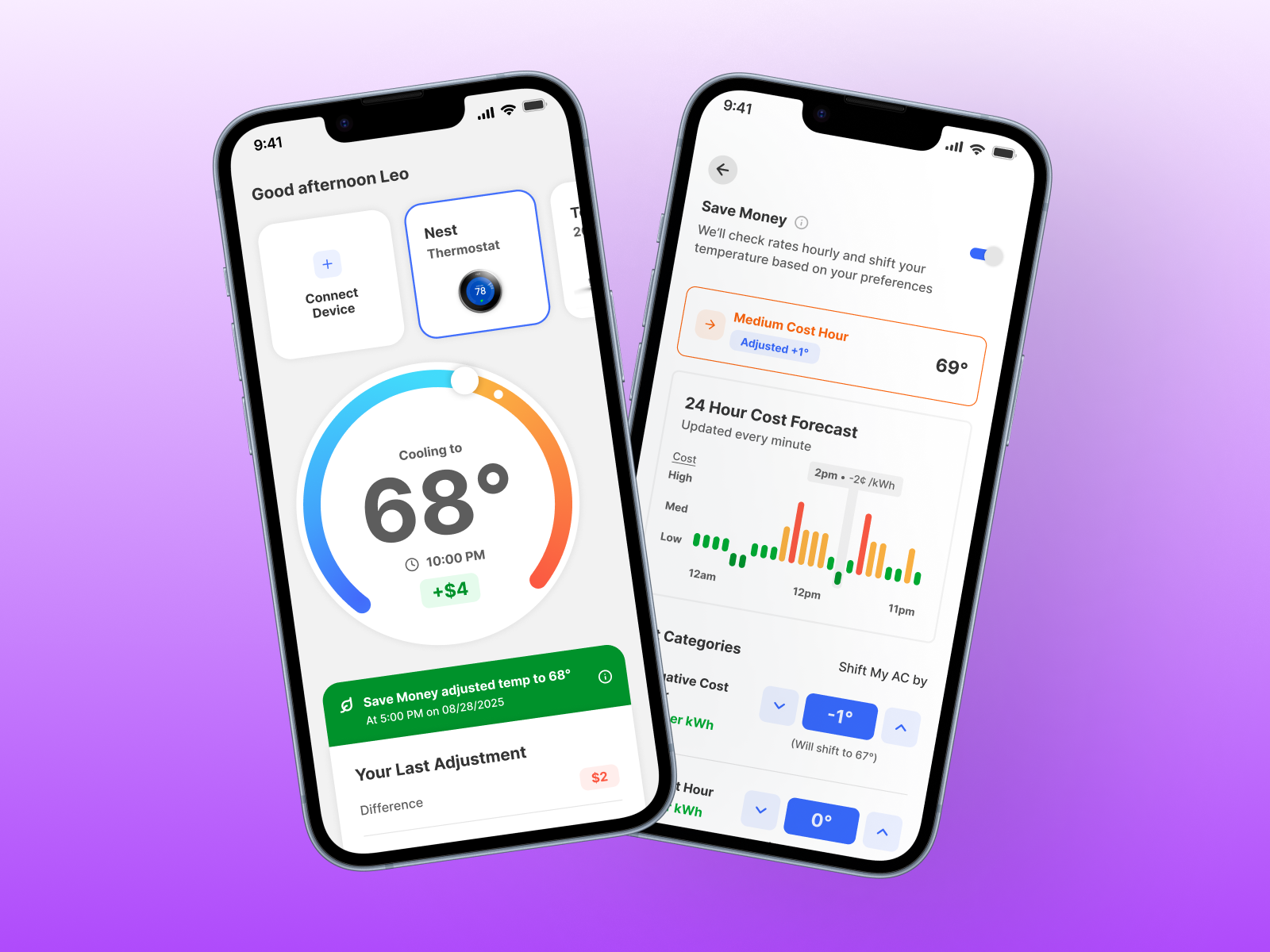
B2C/B2B2C Energy Optimization Platform
Optiwatt - Save Money
Project OVERVIEW
-
About
Optiwatt is a clean energy platform that helps EV owners and utility partners manage electricity usage smarter, reducing costs for consumers and grid pressure for utilities. As Optiwatt expanded beyond EV charging, the platform had a real opportunity to become a whole home energy solution.
The Save Money feature was the first step in that expansion, bringing smart thermostat optimization into the product and positioning Optiwatt to win utility contracts at a scale the EV-only product couldn't reach. This wasn't a speculative side project, it was the foundation of a new revenue stream.
-
Project details
Sector: Climate / Energy
Project Type: UX/UI Design, Product Strategy, User Research
Challenge: Design, launch, and iterate on an industry-first thermostat optimization feature to open a new utility partnership revenue stream.
Team: Leo Gonzalez - Staff Product Designer
Jared Hirata - Product Designer
Rajesh Nerlikar - VP of Product
Danny Murphy & Martin Wienc - Developers
Design Brief
-
Problem
Utility partnerships are Optiwatt's core business, and the platform's EV-only footprint was a proven growth strategy. Thermostats were the logical entry point, in nearly every home and accounting for a significant share of residential energy use. No one in the industry had shipped this kind of optimization experience in a consumer-facing product before. We were building in genuinely ambiguous territory, with real utility contracts on the line and real users whose comfort was at stake if we got it wrong.
-
Project Goal
Success meant two things simultaneously: proving the concept was viable enough to attract utility partners, and delivering an experience users would actually trust with their home temperature. We needed enrollment numbers that could anchor a utility pilot, but more importantly, we needed people to stay enrolled. Retention and NPS were the metrics that would tell us whether we'd truly solved the problem.
-
Strategy
The strategic bet was to ship a lean MVP quickly through a utility pilot program, get real behavioral data from real users, and treat the first version as a learning instrument rather than a finished product. Once we had usage data and a round of qualitative interviews in hand, we'd have enough signal to make targeted, high-confidence improvements. The goal was speed to learning first, then speed to polish.
Key Results
-
85%
Retention Rate across the pilot program after updates
-
34%
Increase in feature adoption across program users
-
48 NPS
NPS score increased from 36 prior to feature update
Discovery
Discovery
Exploring user needs and market gaps to create the right product.
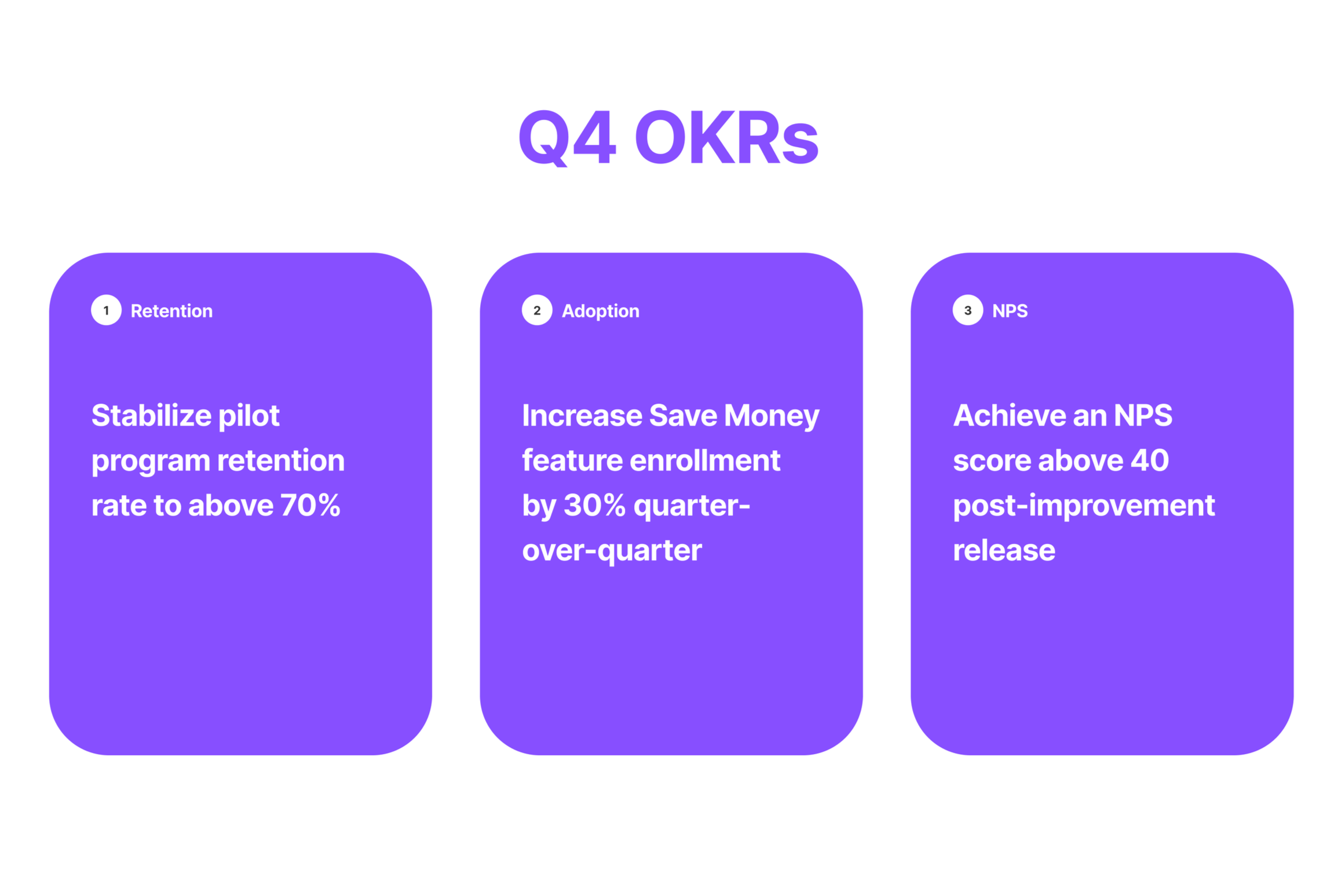
PROJECT OKRS / METRICS
Before a single pixel was designed, I collaborated with the product and engineering team to define OKRs that tied directly to company goals. With utility partnerships as Optiwatt's core revenue driver, every key result was chosen to demonstrate that Save Money could move the metrics that mattered most to the business, retention, enrollment growth, and user satisfaction.
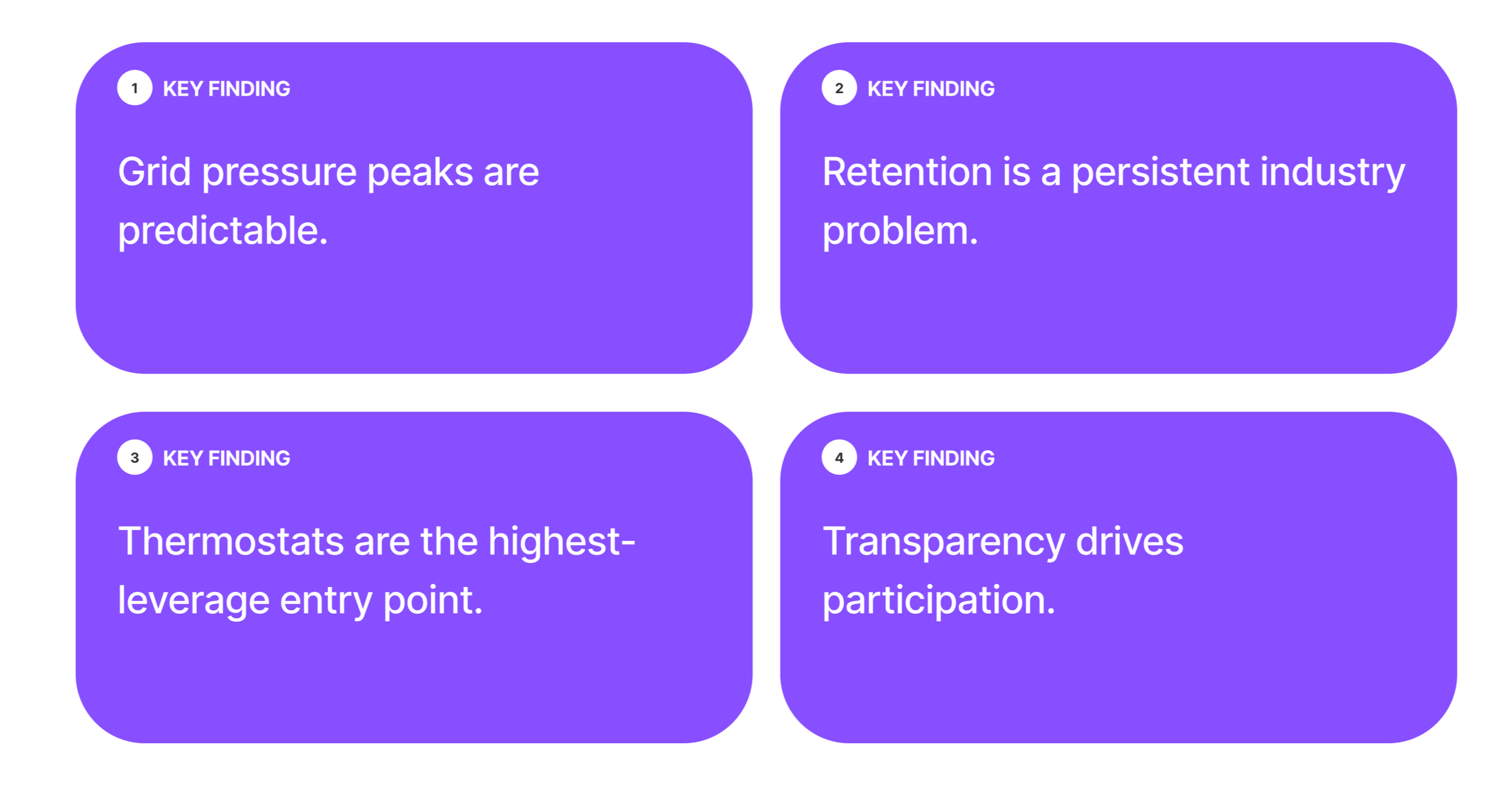
Stakeholder & Utility Partner Input
Customer success and leadership held early conversations with our utility partner to understand what success looked like from their side of the table. Their notes were relayed back to the product team, giving us the business context we needed to move in the right direction. Four key insights validated Save Money as the right bet:
Competitive Analysis
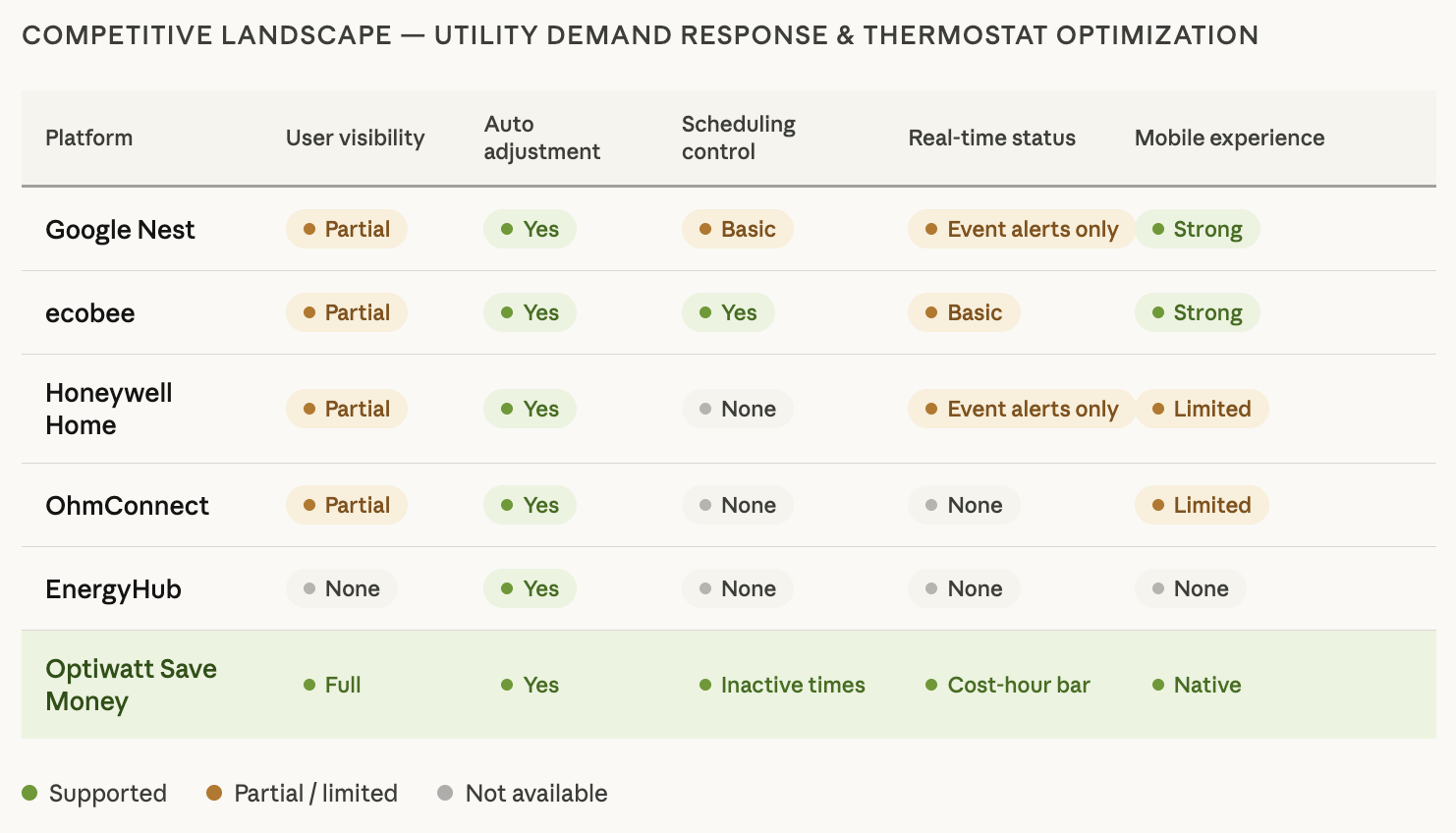
Before committing to a design direction, I conducted a competitive analysis across utility demand-response programs and smart thermostat platforms to understand the existing landscape. The pattern that emerged was consistent: most programs were either too manual or too opaque, making automatic adjustments with zero user visibility or control. Trust was the missing ingredient across the board, and that gap directly shaped our design strategy.
DEFINE
DEFINE
Turn research into clear objectives, create a roadmap, and establish product priorities.
Aligned Project Goals
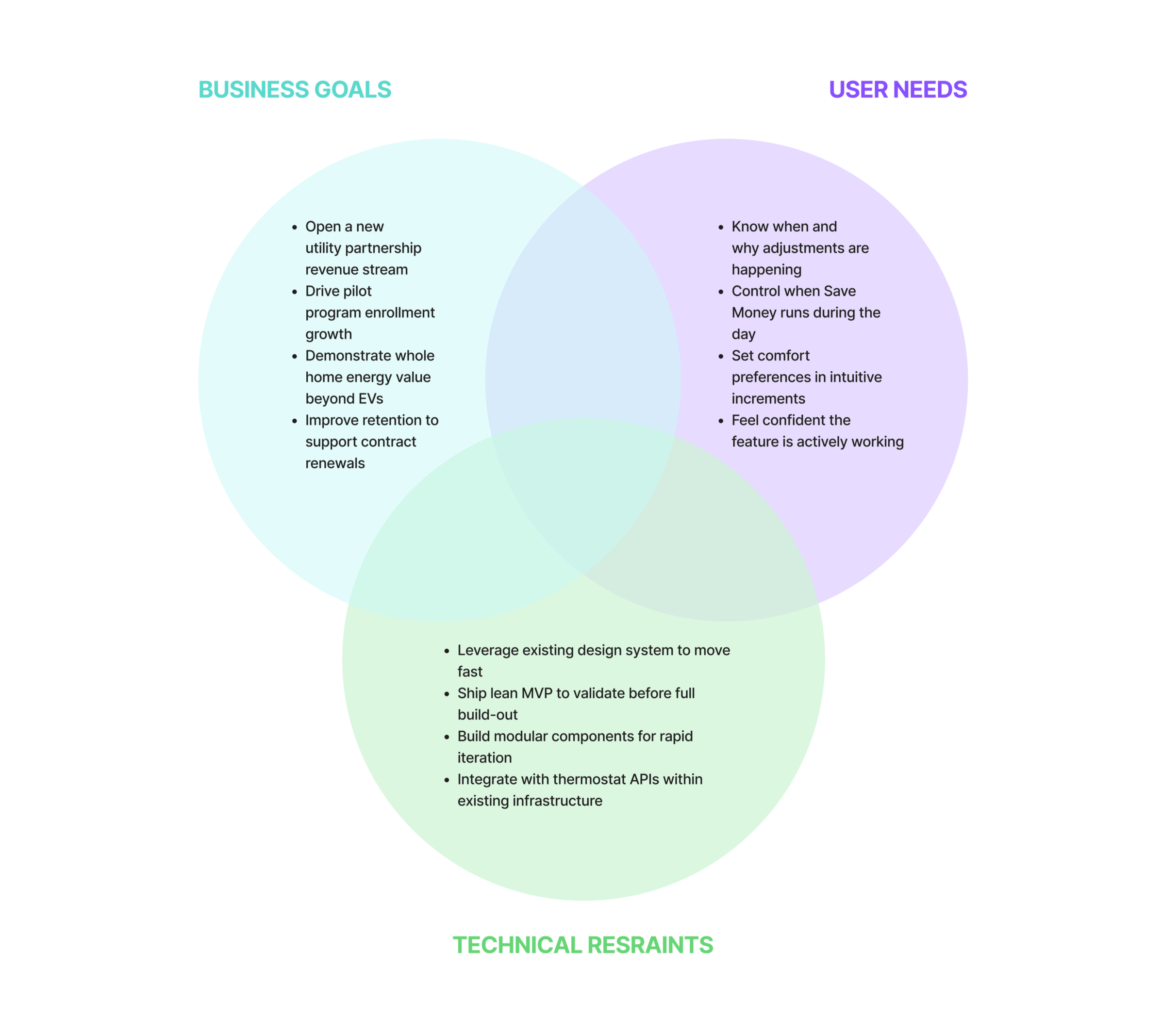
With the competitive landscape mapped and utility partner insights in hand, I collaborated with the product and engineering team to align on business goals, user needs, and technical constraints. The gap we identified — automation without transparency — became the north star for the feature. We aligned on a clear hypothesis: if users felt informed and in control, enrollment and retention would follow.
Product Roadmap
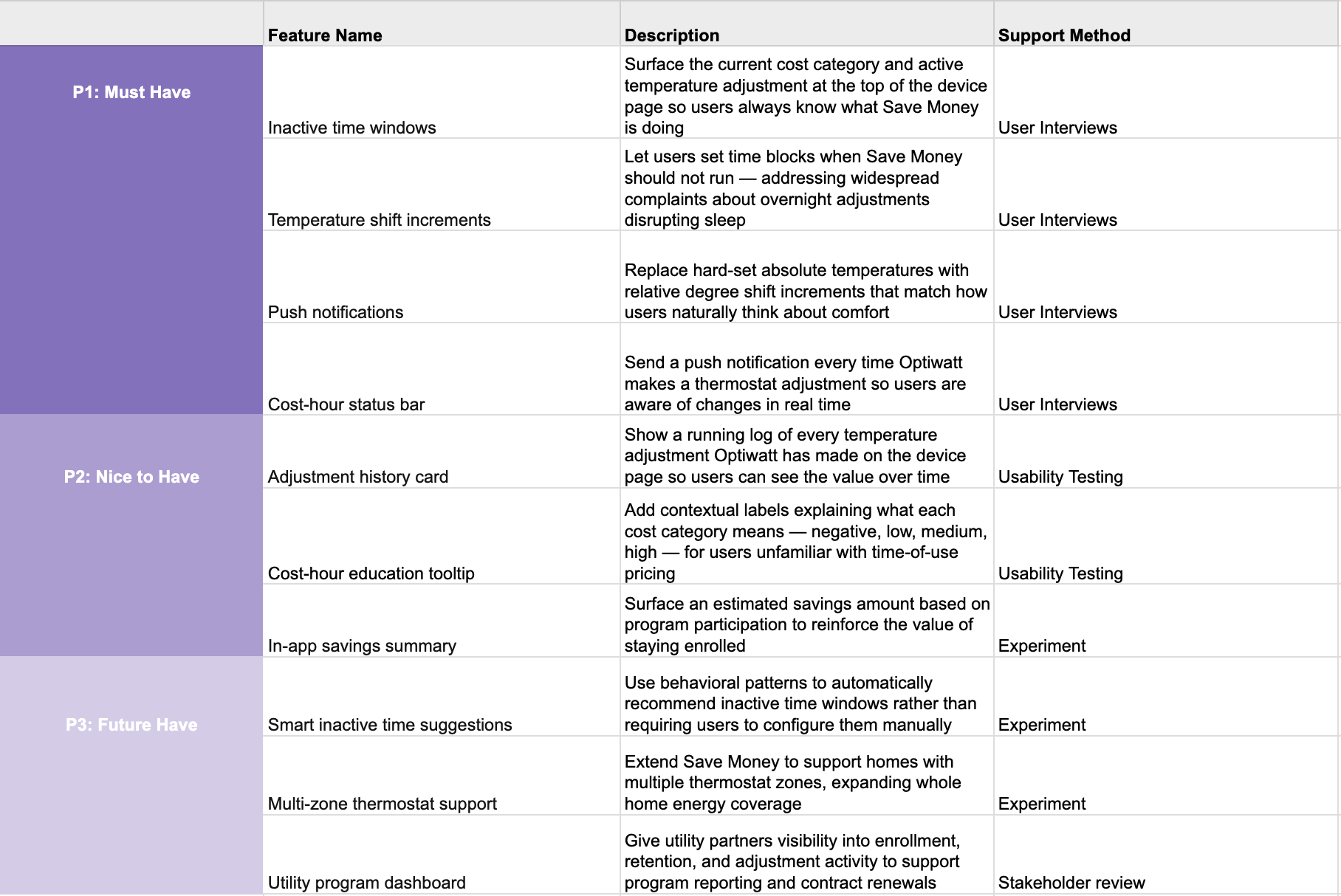
With aligned goals in hand, I worked with the team to build a prioritized feature roadmap. Inactive time windows, temperature shift increments, a real-time status bar, and push notifications made the cut for the immediate improvement sprint.
Deeper personalization features — like learning-based schedule suggestions and multi-zone support — were scoped to a future phase. We needed to ship meaningful improvements before the next utility contract renewal cycle, so scope discipline was non-negotiable.
IDEATE
IDEATE
Brainstorm, refine ideas, and explore different approaches to shape the product’s direction.
UPDATED INFORMATION ARCHITECTURE
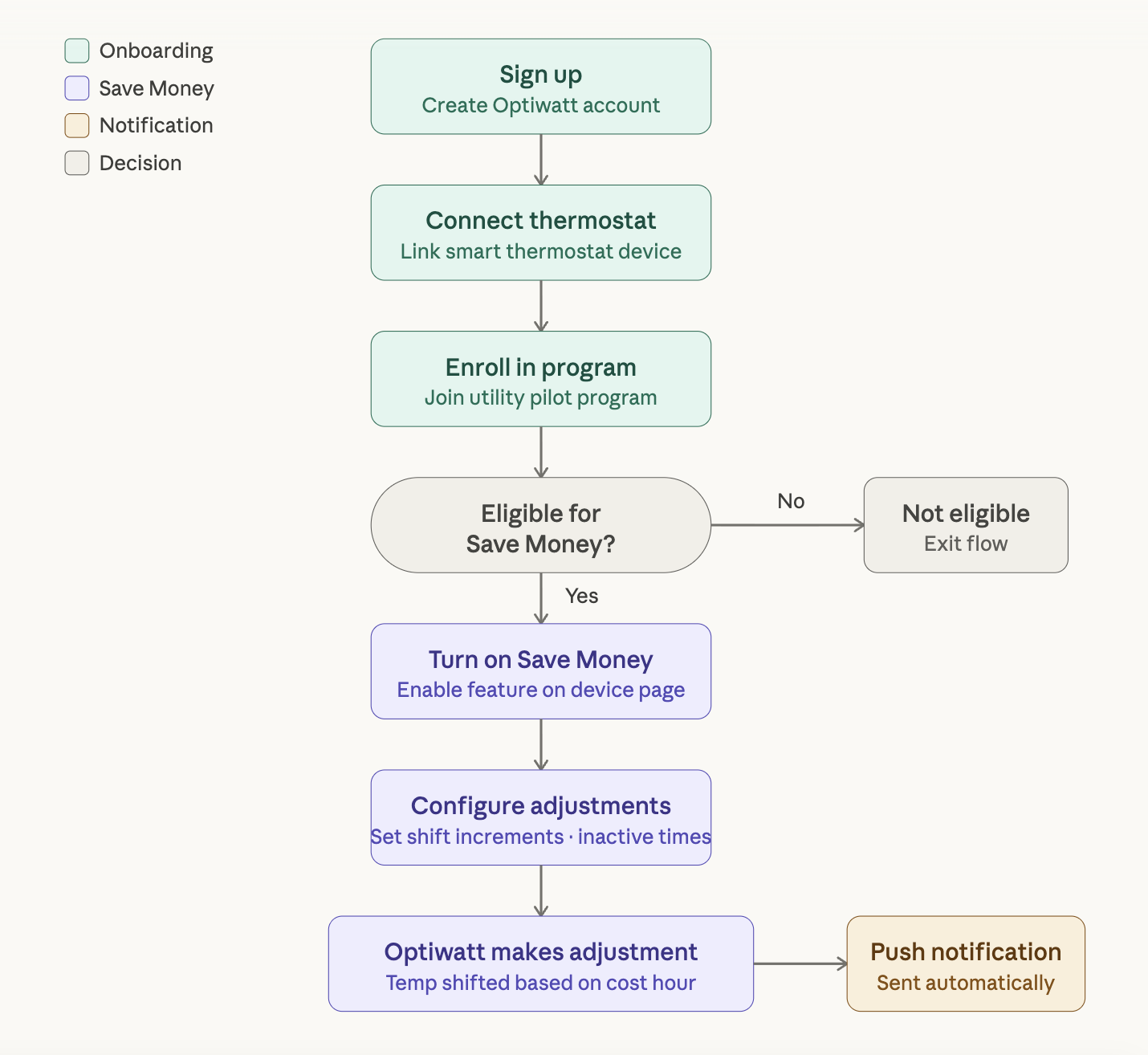
The Save Money feature lived within Optiwatt's broader thermostat device page, so its information architecture had to integrate cleanly into an existing structure. The key IA decision was surfacing the current cost-hour status at the top level of the device page, so users could get a real-time read on what Optiwatt was doing without navigating anywhere deeper.
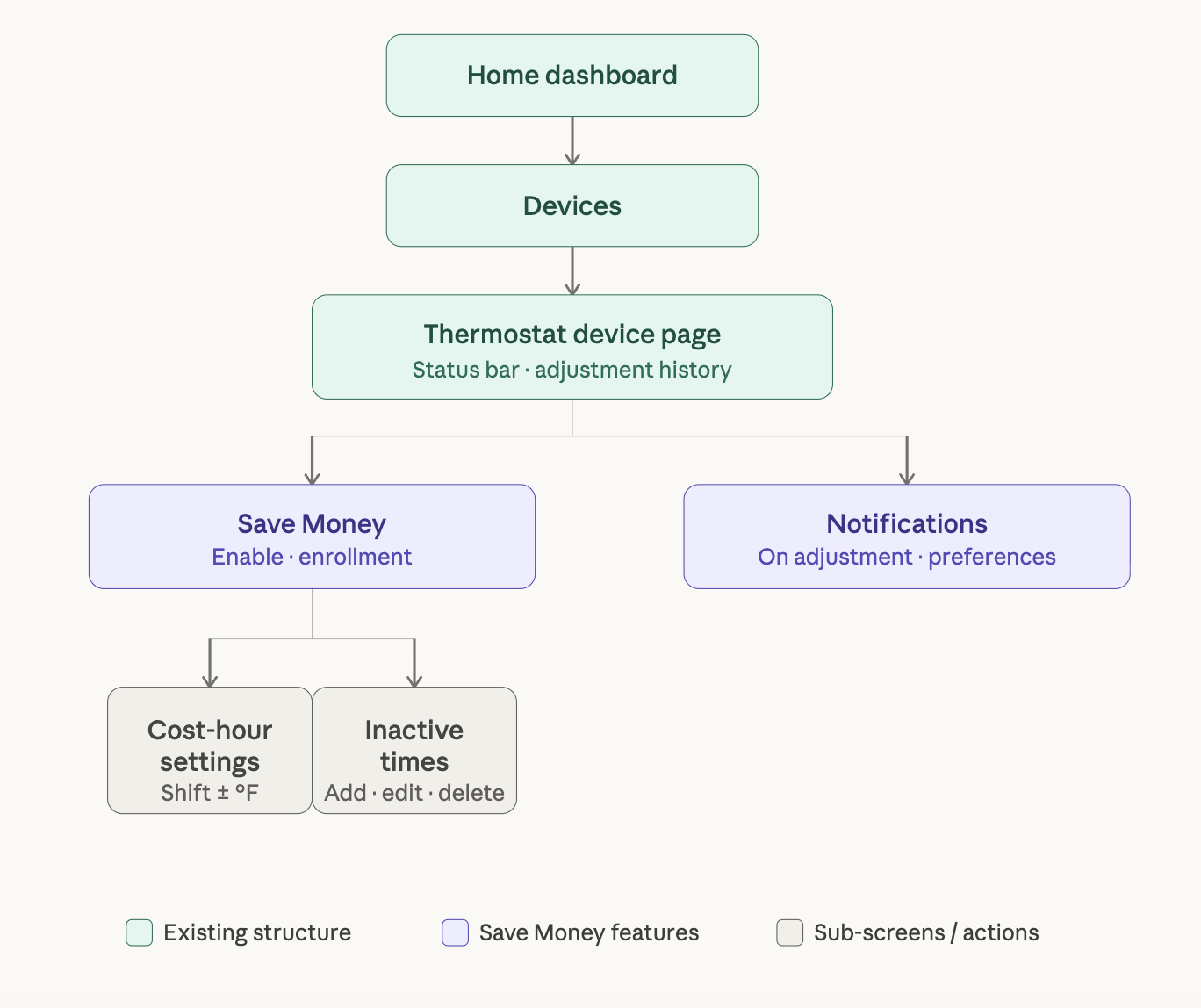
CUSTOMER JOURNEY FLOW
The primary flow I focused on was the Save Money configuration and monitoring journey, from first-time setup through ongoing passive use. I mapped two entry points into inactive time settings: a prompt during onboarding and an edit flow from the device page. Both paths converged on the same settings state, reducing screen count and eliminating a confusing duplicate-settings problem from the MVP.
Initial DESIGN EXPLORATIONS
Jared put together initial design explorations ahead of a design kick-off and review session, giving the team a concrete starting point to align around. The session brought together product, engineering, and design to pressure-test early directions, ask the right questions, and build shared understanding of the problem before moving into higher fidelity work.
Prototype
Prototype
Develop a functional model to replicate the user experience and validate features before full development.
DEVELOPING Design Principles
Working closely with our PM, we aligned on the brand and design principles that would guide the feature, ensuring Save Money felt cohesive with the broader product rather than a bolt-on addition. The visual direction for Save Money needed to feel like a natural extension of Optiwatt's existing brand — clean, tech-forward, and trustworthy.
Design System
Since Save Money was an experiment built for rapid iteration, we leaned heavily on Optiwatt's existing design system rather than building from scratch. Where the existing components fell short, I built targeted new assets directly in Figma using the Figma MCP skill — keeping the surface area small and the handoff clean so we could move fast without accumulating design debt.
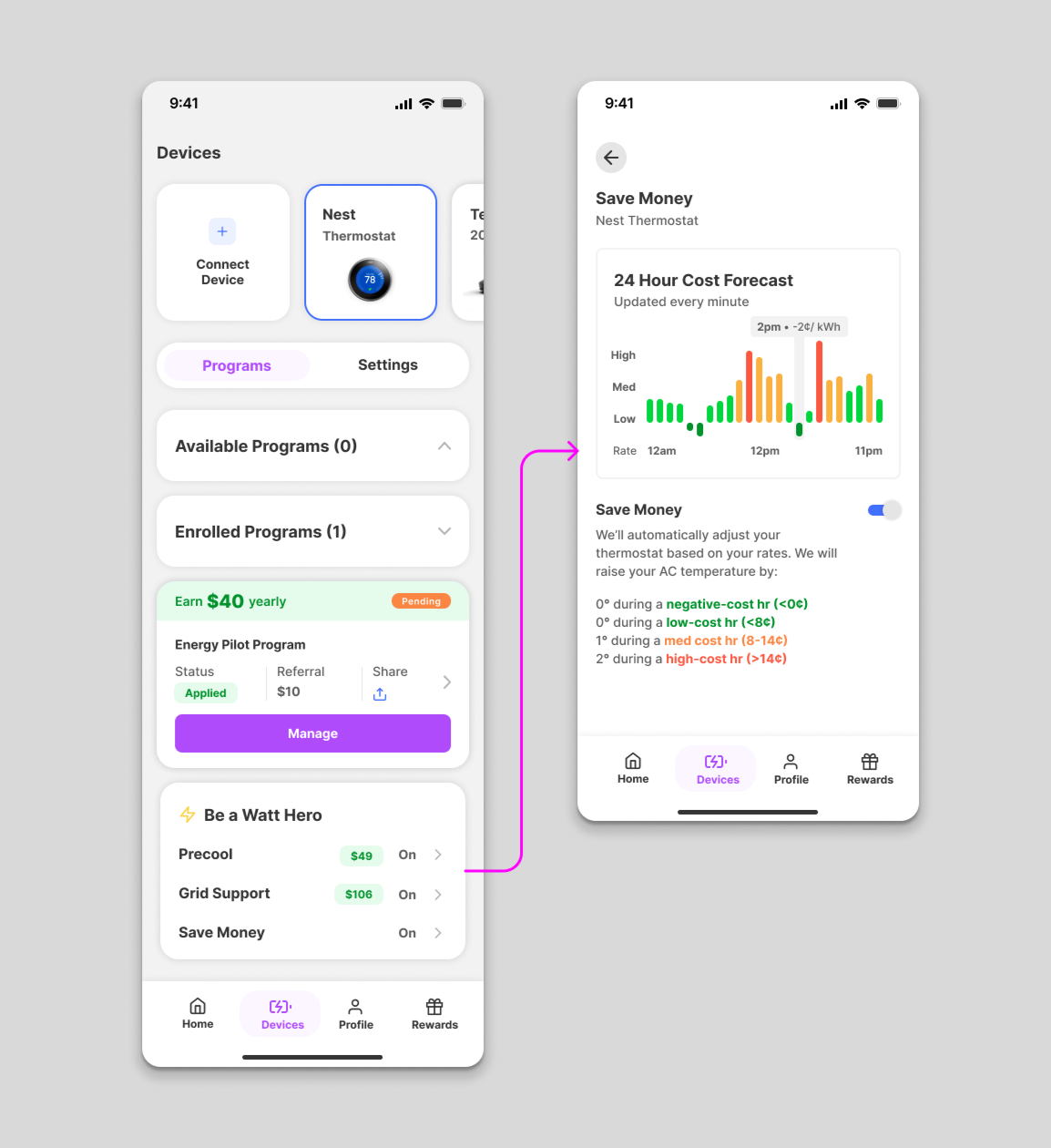
LAUNCHING THE MVP PRODUCT
Jared and I designed the first version of Save Money — an industry-first thermostat optimization experience where users could set specific temperatures across four cost states: negative, low, medium, and high. It was intentionally lean, launched through a utility pilot program to validate the concept, enroll pilot users, and generate the behavioral signal we needed to iterate with confidence.
RESEARCH & VALIDATION
RESEARCH & VALIDATION
Assess how well users understood the Save Money feature and identify opportunities to improve the experience.
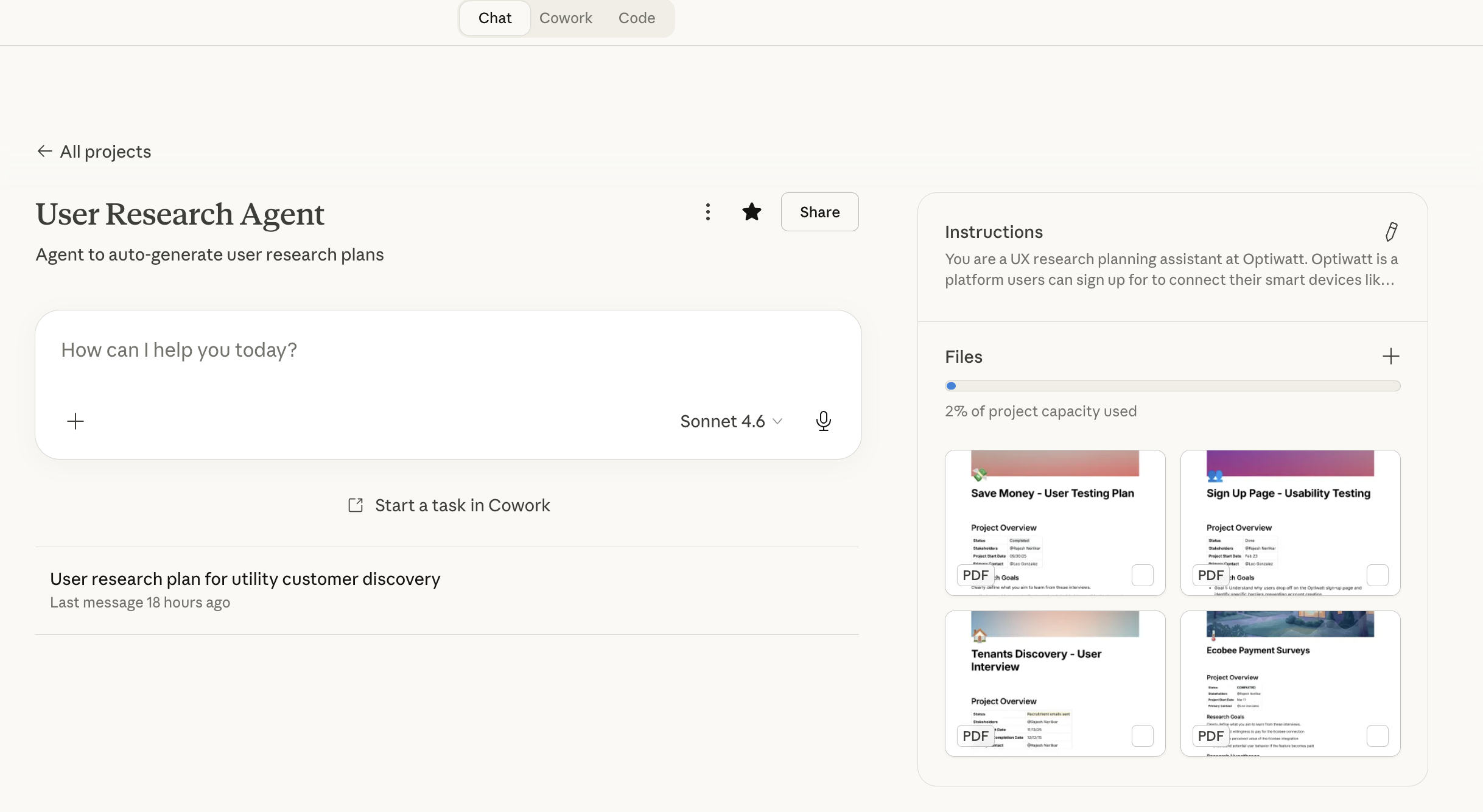
Claude Research Agent
To support the research process, I built a custom Claude project trained on past user research plans to generate structured, consistent research documentation. By feeding it previous research plans as context, the agent learned the format and standards the team expected — and could produce a full research plan in minutes rather than hours.
I connected the agent directly to Notion, so generated plans synced to the team's workspace automatically. This meant research documentation was immediately available for async review without any manual copying or formatting. It removed a coordination bottleneck and let the team spend time reacting to the plan rather than waiting for it.
User Interviews
After launching the MVP through the utility pilot program, I recruited 6 participants directly from the pilot cohort for 30-minute 1-on-1 interviews. Rather than a task-based usability test, these were open-ended conversations designed to surface perception gaps, unmet expectations, and friction points that quantitative data alone couldn't explain.
User Interview Objectives:
Understand how users perceive and interpret automatic thermostat adjustments made by Optiwatt and whether they feel informed and in control
Identify the specific moments in the Save Money experience causing friction, confusion, or loss of trust
Uncover unmet expectations around scheduling, communication, and temperature preferences the MVP did not address
SHARING RESEARCH INSIGHTS
Users had almost no visibility into when or why Optiwatt was adjusting their thermostat — and that invisibility was eroding trust fast. The overnight adjustment problem was widespread, with [5 of 6 participants] mentioning unexpected temperature shifts during sleeping hours.
The hard-set temperature model didn't match how people think about comfort — users reasoned in relative terms, not absolute degrees. Participants who received no in-app feedback after enrollment felt "forgotten," with no way to know the feature was actively working for them. Despite all of this, every participant said they wanted the feature to exist. The concept had real pull — the execution just hadn't caught up yet.
Updated designs
Armed with research-backed insights, I redesigned Save Money to directly address every friction point surfaced in interviews — introducing a real-time cost-hour status bar, temperature shift increments, inactive time windows, and push notifications. Where the MVP asked users to trust a black box, the updated experience gave them visibility, control, and a feedback loop.
OUTCOMES
OUTCOMES
Performance metrics, testing insights, project reflection & next steps in product development.
Key Results
-
85%
Retention Rate across the pilot program after updates
-
34%
Increase in feature adoption across program users
-
48 NPS
NPS score increased from 36 prior to feature update
Future roadmap
Following the improvements release, I collaborated with the product team to map out a phased roadmap for what came next. Priorities were sequenced around impact — starting with the adjustment history card and pilot expansion, moving into smarter automation and a follow-up research round, and closing with longer-horizon features like multi-zone thermostat support and a utility partner dashboard.
FINAL DESIGNS